
ERP Software for Discrete Manufacturing: How to Build a Needs-Based Shortlist
Start with the product and production model
ERP software is a system for coordinating the operational functions that determine how your business buys, makes, sells, and accounts for identifiable products. In discrete manufacturing, ERP systems can coordinate planning, procurement, production, inventory, quality, maintenance, finance, and order fulfillment for units or assemblies. The practical question is not whether a product carries an ERP label; it is whether the system can connect the work your operation actually performs.
Shared ERP data connects finance, inventory, production, purchasing, and sales in a single system. A centralized ERP database can provide a single source of truth for business operations and reduce duplicate data between departments. That connection matters when a customer order changes demand, a material shortage affects a work order, or production activity changes the financial picture. Your shortlist should therefore start with information flow, not with a list of software modules.
Trace product definition through the production flow
A discrete manufacturing production flow should connect demand, materials, capacity, work orders, shop-floor activity, costs, and fulfillment. Manufacturing ERP production-planning modules can translate customer demand into work orders, calculate material and capacity requirements, track actual versus estimated job costs, and provide operations managers with shop-floor visibility. Use that flow as the backbone of your requirements document.
Production scheduling and planning in a discrete-manufacturing ERP can integrate inventory, shop-floor, and order-management data while supporting capacity planning, material requirements planning, and finite or infinite scheduling. Ask which planning logic matches your constraints, then test a realistic scenario: limited material, competing orders, a constrained machine, and a changed delivery date. A product that handles a simple forward plan may still require further evaluation when your operation must replan around exceptions.
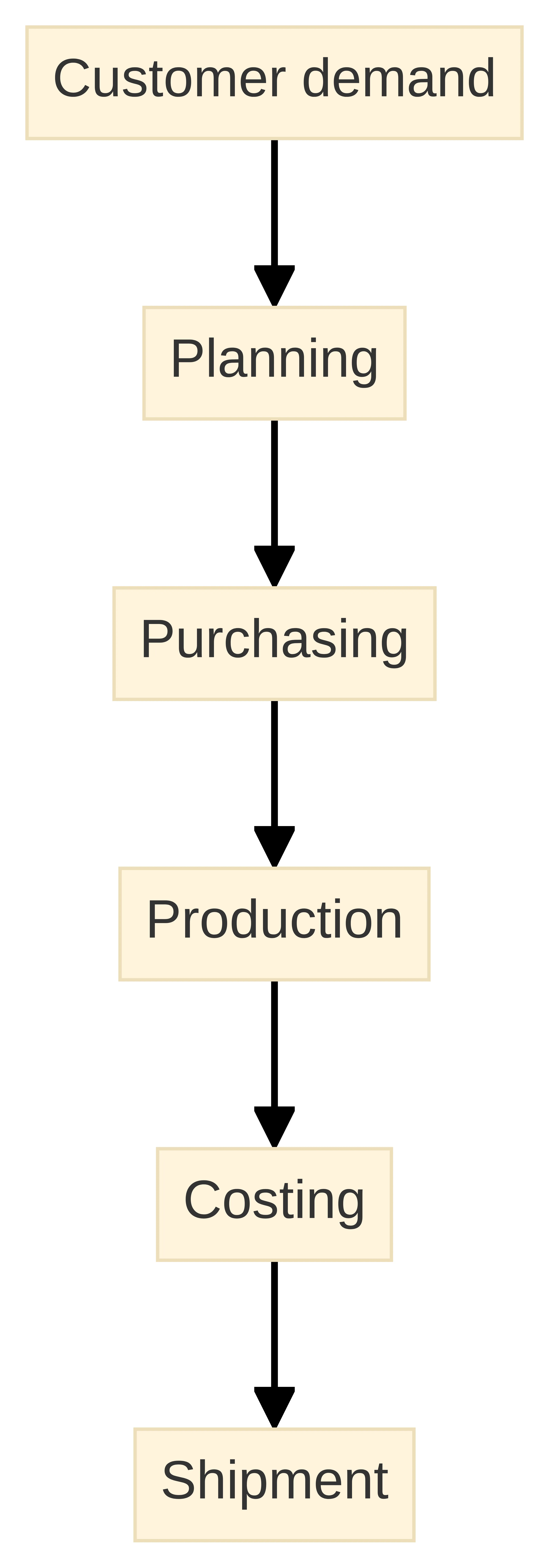
A manufacturing workflow test should use your own products, terminology, and edge cases. Script the sequence from customer demand through planning, purchasing, production, costing, and shipment, and require every shortlisted option to follow the same path. This approach gives you a comparable view of how each system handles the work rather than a disconnected tour of menus.
Cover the manufacturing capabilities that affect fit
Manufacturing ERP capabilities affect fit when they support the records and decisions your operation must make. Discrete-manufacturing systems may include embedded advanced planning and scheduling, finite-capacity planning, lot and serial traceability, and quality management. Treat those capabilities as requirements to examine in context, not as proof that every system with a manufacturing edition handles your processes in the same way.
Production planning and inventory control should be evaluated together. Production planning can use inventory, shop-floor, and order data for material requirements planning and capacity decisions, while manufacturing production modules can calculate material requirements and track actual against estimated job costs. Ask the vendor to show how a shortage, substitute component, partial completion, or delayed operation changes the plan and the related records.
Purchasing and finance should remain connected to production without forcing you to reconcile separate records by hand. ERP systems can automate supply-chain tasks such as inventory tracking, purchase orders, and customer billing. During evaluation, trace a purchased component from requirement to receipt, use, job cost, and invoice so you can see where ownership and data changes occur.
Quality and traceability requirements should be written as records and actions rather than broad promises. Manufacturing-specific ERP systems may include lot and serial traceability and quality management as embedded capabilities, while ERP systems can support risk management by maintaining records for audits. Define the exact item, lot, serial, inspection, nonconformance, approval, and audit information you need to retrieve, then ask for a demonstration using a real product history.
Reporting requirements should name the decisions the report supports. ERP analytics can help teams track performance against key metrics, and ERP buyers may evaluate performance, usability, scalability, integration, deployment options, and resilience. Instead of asking whether a system has dashboards, request examples such as late-order exposure, material availability, work-in-process status, actual versus estimated job cost, and quality history. The response should show the source records, update path, and users who can act on the information.
Use the production model as the first filter
Start the ERP screening record with your production model: the system must represent what triggers work and how much product definition changes from order to order. Make-to-order manufacturing is a pull-based system in which actual customer demand drives production rather than predicted sales. Acumatica’s manufacturing management description, published June 5, 2026, says its software supports discrete, process, make-to-stock, make-to-order, configure-to-order, engineer-to-order, and project-centric production models.
A production-model screen should ask four direct questions:
- What starts production? Determine whether forecasts, firm orders, replenishment signals, or engineering projects create demand.
- How stable is the product definition? Check whether you make a repeatable bill of material, configure variants, or engineer a new product for each order.
- How much planning flexibility is required? Identify whether capacity, material availability, and delivery commitments must be recalculated frequently.
- What evidence must follow the product? Specify the lot, serial, revision, quality, and cost records required from release through shipment.
Advance an option only when its demonstrated production model matches your operating pattern and its boundaries are clear.
A vendor’s stated support for several production models is a starting point, not a universal fit conclusion. If your business assembles electronics, automotive components, aerospace products, or medical devices, test the specific revision, configuration, traceability, and approval steps your teams use rather than selecting from the production-model label alone.
Separate platform and deployment trade-offs
ERP platform fit includes functional coverage and the qualities that determine whether people can use the system in daily operations. Discrete-manufacturing ERP selection criteria include functional fit, data integrity, integration capability, implementation governance, cybersecurity, user adoption, and support for multi-site operations without excessive process complexity. ERP buyers may also evaluate performance, uptime, scalability, usability, deployment options, resilience, and the supplier’s familiarity with the buyer’s industry.
Deployment should be evaluated as an operating choice rather than a branding shortcut. Compare the control, access, infrastructure responsibility, update approach, integration requirements, and scaling expectations attached to each deployment option. Align platform capabilities with your operational needs, existing technology ecosystem, and deployment schedule. Ask who owns each technical responsibility and how the arrangement affects production continuity, data access, and future expansion.
A platform and deployment review should record:
- The manufacturing functions available in the proposed scope.
- The data and integration responsibilities assigned to your team.
- The security and resilience controls that apply to the arrangement.
- The user experience for planners, buyers, shop-floor staff, quality teams, and finance.
- The way additional sites, products, users, or transaction volume would be handled.
- The support model and the supplier’s familiarity with your manufacturing environment.
Use the list to expose trade-offs. Do not allow a general cloud, on-premises, or enterprise label to replace a requirement-level assessment.
Screen integration and data exposure early
ERP integration connects systems of record when a business process crosses application boundaries. Application integration can use event-based API or connector calls, while scheduled asynchronous connectivity is another common pattern. For a discrete manufacturer, map the handoffs between ERP, customer orders, engineering, warehouse activity, shop-floor systems, quality records, shipping, and finance, then identify which system owns each record.
Legacy ERP integration can face barriers including missing OData support, synchronous communication requirements, compatibility and security constraints, limited documentation, unavailable source code, and scarce integration expertise. Those conditions should appear in your requirements before vendor selection. Ask each option how it would connect to the systems you already use, what data can move in each direction, how failures are surfaced, and which responsibilities would remain with your team.
An integration and data screen should cover more than whether an interface exists. Check the following items:
- Record ownership for items, bills of material, revisions, customers, suppliers, inventory, work orders, and financial transactions.
- Timing requirements for event-based and scheduled exchanges.
- Authentication, authorization, security, and error handling.
- Historical data that must be migrated or retained.
- Duplicate records, inconsistent identifiers, and incomplete product data.
- The reports and operational decisions that depend on synchronized information.
Advance an option only when the data path, exception path, and ownership path are understandable.
Match ERP scope to the manufacturer’s complexity
ERP scope should match the complexity of your products, facilities, supply chain, and operating controls. Discrete-manufacturing selection criteria include data integrity, implementation governance, user adoption, and support for multi-site operations without excessive process complexity. ERP software can support growth and changing market demands as operations expand or enter new markets, but that possibility does not remove the need to define the scale you require.
Different operating situations create different fit questions. An aerospace assembler may need detailed revision and traceability records; an automotive supplier may need disciplined planning and delivery coordination; an electronics manufacturer may need configuration and component visibility; a medical-device manufacturer may need quality and audit records. These examples should become test scenarios, not assumptions about which product fits your business. Define the actual controls, volumes, sites, products, and exceptions that your operation must support.
Scale and support should be assessed together. Evaluate how an option handles additional sites, changing product ranges, increased transaction demands, user growth, and new integrations, then document the support model for the people who will maintain and use it. Supplier familiarity with your industry, user adoption, resilience, and multi-site support are all selection criteria. A system that fits one facility’s workflow may require a different assessment when your organization has shared services or multiple operating locations.
A complexity review should end with a boundary statement. Write down which processes the ERP must cover, which systems will remain outside it, which sites belong in the first phase, and which growth scenarios the architecture must accommodate. Align those boundaries with operational needs, the existing technology ecosystem, and the deployment schedule before you compare vendor responses.
Test product-model boundaries in vendor demonstrations
An RFI gathers general capability information from a longer list of ERP vendors. Use the responses to populate the screening record and narrow the field, not to make the final fit decision. Give every vendor the same short description of your production models, required workflows, integrations, data conditions, sites, users, and cost boundaries. Ask for a clear indication of standard capability, configuration, customization, third-party dependency, and unresolved limitation.
Move from a general demo to a product-model boundary test. Give each option a representative scenario: a make-to-order demand signal, a configured or engineered product with a revision, or a stocked assembly with constrained capacity. Ask it to show the resulting product definition, material and capacity plan, work order, production record, inventory trace, and cost handoff. Use company data, realistic edge cases, and the same sequence for every option, while recording which steps are standard, configured, customized, or dependent on another product.
A published manufacturing description is only a starting point for a fit test. Convert each statement into a demonstration request: create a revision, plan material, schedule constrained capacity, configure a product, record production, and trace the resulting inventory and cost records.
A vendor-evaluation record should separate what you were told from what you observed. For each requirement, capture the demonstration scenario, result, conditions, data used, responsible vendor contact, open question, and next action. Use reference checks, site visits, a security review, and proof of value before contracting. Do not convert an attractive presentation into a capability conclusion without a testable result.
Include the full cost of ownership
ERP implementation cost includes more than the software license or subscription. Approved cost categories include software licensing, professional services, internal labor, infrastructure, data work, training, and ongoing support. Build your comparison around the full period you intend to evaluate, and keep one-time implementation costs separate from recurring operating costs so the trade-off remains visible.
A total-cost review should ask who performs and pays for each activity:
- How are licensing or subscription charges structured?
- Which professional services cover configuration, integration, testing, and deployment?
- How much internal labor is required from operations, IT, finance, engineering, and shop-floor teams?
- What data cleansing, migration, reconciliation, and retention work is required?
- What infrastructure, training, support, and ongoing administration costs apply?
- How would additional sites, users, integrations, or production complexity change the cost profile?
Use the answers alongside capability and deployment requirements. A lower headline price does not establish a lower total cost when required work sits outside the quoted scope.
Your cost worksheet should carry assumptions beside every estimate. Record the included sites, users, modules, integrations, data volumes, training responsibilities, support coverage, and term so you can compare like with like. Keep uncertain items open rather than assigning precise prices or savings that have not been established.
Build a needs-based screening record
A needs-based screening record should translate production requirements into documented questions and test conditions, rather than begin with familiar vendor names. Start with your operational requirements, existing technology ecosystem, and deployment schedule, then reduce the field as options meet or fail the same tests. The sequence below keeps manufacturing fit at the center of the decision.
Use this sequence to turn production-model requirements into a needs-based screening record:
- Name the product families. Record the assemblies you make, their product-definition structure, revisions, configurations, and traceability needs.
- Classify demand. Mark each family as make-to-stock, make-to-order, configure-to-order, engineer-to-order, or project-centric where applicable.
- Expose the planning boundary. Describe material, capacity, labor, outside-operation, delivery, and exception conditions that the system must handle.
- Specify the operating record. Define the work orders, inventory movements, quality records, costs, and financial handoffs that must result from production.
- Separate connected-system questions. Identify interfaces, migration needs, data-quality conditions, security requirements, sites, users, support, deployment, and implementation cost categories.
- Use an RFI for breadth. Ask the same model-specific questions across a longer list of vendors and distinguish stated capability from demonstrated behavior.
- Run model-specific demonstrations. Use company data and edge cases to test each product family, production model, revision, constraint, and required record.
- Advance only supported options. Keep systems that meet mandatory model-specific requirements and explain their conditions, dependencies, and unresolved gaps.
Use the production-model fit matrix as the screening record, with one row for each product family and production model. For each row, capture questions about integration, data integrity, deployment options, scalability, usability, performance, resilience, and the supplier’s familiarity with your industry. Add the demonstration result, conditions, and unresolved gap rather than a single undifferentiated rating. This keeps a system that fits one model from appearing to fit every model.
The shortlist decision is to choose which options deserve deeper evaluation, not to declare a universally suitable ERP. Advance the systems that can demonstrate your mandatory workflows, explain their conditions and boundaries, and provide a credible path through integration, data, security, adoption, support, and cost questions. Keep an option out of the next stage when a material requirement remains untested or unsupported.
Recognize the evidence limits
Vendor capability descriptions are time-bound inputs to a selection process. Acumatica’s manufacturing description was published June 5, 2026, and its stated support for production models and native functions should be checked against the version, scope, and commercial configuration you are evaluating. Use current demonstrations and proof-of-value work before treating a vendor statement as an operating conclusion.
ERP fit cannot be established from a feature list alone. Functional fit, data integrity, integration, implementation governance, cybersecurity, user adoption, multi-site support, and process complexity all affect the decision. Keep unsupported assumptions visible, record the conditions behind each conclusion, and require a direct test whenever a requirement could change the shortlist.
Turn production-model requirements into vendor questions
Before requesting vendor information, prepare a production-model screening record. For each product family, name the production model, BOM and routing structure, revision or configuration needs, planning and capacity constraints, inventory and traceability records, quality checks, financial handoffs, integrations, data conditions, sites, users, support expectations, deployment limits, and implementation cost categories. Attach one realistic scenario for each mandatory combination of product definition and production model.
Use a needs-based screening record for discrete manufacturing to answer a narrower question than which ERP has the most features: which options can represent your products and production models, plan their constraints, and preserve the required records as work moves through the operation? Use the production-model screening record to test those boundaries, then investigate integration, data, support, deployment, and cost before advancing a candidate. That production-model record gives the next evaluation stage a concrete basis without treating a vendor’s category labels as proof of fit.
What should a manufacturer verify before advancing an ERP option?
What is ERP software and how does it connect core business functions?
ERP software is a system that coordinates operational functions such as planning, procurement, production, inventory, quality, maintenance, finance, and order fulfillment. It connects these functions through shared data in a centralized database, providing a single source of truth for business operations.
What capabilities should discrete manufacturers look for in ERP systems?
Discrete manufacturers should evaluate ERP systems for capabilities such as production planning, inventory management, purchasing, financial management, quality control, traceability, and reporting. These capabilities should align with their specific operational needs.
How can I assess the operational fit of an ERP system for my manufacturing business?
To assess operational fit, consider criteria such as the manufacturing model, company complexity, integration needs, scalability, data management, support, and total cost. Each ERP option should be tested against these criteria to ensure it meets your business requirements.
What should be included in the total cost of ownership for ERP implementation?
The total cost of ownership for ERP implementation should include software licensing, professional services, internal labor, infrastructure costs, data migration, training, and ongoing support. It’s important to evaluate both one-time implementation costs and recurring operating costs.
How can I create a needs-based shortlist of ERP software options?
To create a needs-based shortlist, start by documenting your operational requirements, mapping critical workflows, and setting requirement levels. Use an RFI to gather information from vendors, run comparable demonstrations, and investigate material risks before finalizing your shortlist.
What role does integration play in ERP systems for discrete manufacturing?
Integration is crucial in ERP systems as it connects various systems of record across business processes.
Keep reading
Related articles
Free account
Create A Free Account
Get the clarity you need to make confident ERP decisions — without the sales pressure.
- Read every article (past & future)
- Compare ERP systems side by side
- Access exclusive guides, checklists, and cost breakdowns
- Stay current on industry updates and trends
Get expert guidance at no cost
Rather talk to a specialist?
Book a free call with one of our ERP specialists for a no-obligation needs assessment. We'll help you understand your options, cut through the noise, and figure out what actually makes sense for your business — before you ever talk to a vendor.
Book A Free Call