
ERP for Medical Device Manufacturing: How to Build a Needs-Based Shortlist
Device-record evidence gaps shape the shortlist
The initial research set should be organized around the records and decisions a medical-device operation needs to examine: lot or serial history, inspection points, rework, outside processing, production status, and validation-related controls. This is not a ranking of ERP products. It is a way to identify candidates whose handling of these workflows warrants further evaluation.
A device-record path should anchor each evaluation. For every workflow, note where the record is created, how it connects with materials, production, inventory, and quality activity, and what the system can show after a change or during an investigation. Keep a vendor’s stated capability separate from what the relevant demonstration or documentation establishes, and retain unresolved dependencies before moving a candidate forward.
ERP software can connect finance, inventory, production, purchasing, and sales through shared data. That connection is a starting point for a medical-device evaluation, not evidence that every required record or control is handled in the needed way.
The comparison should follow the device records that cross departments:
- Can the candidate preserve lot or serial history through production and inventory?
- How are inspections, quality results, audit trails, electronic signatures, and supporting documents recorded?
- Which parts of the workflow are standard, configurable, or dependent on another system?
- What remains outside the ERP, and who owns the related quality or validation-related record?
These questions connect broad ERP integration with the specific evidence required for an initial shortlist. ERP software alone does not make a medical-device organization compliant.
Treat the shortlist as a working decision record rather than a list of names. For each candidate, retain the requirement being tested, the scenario used, the resulting record, and the unresolved dependency. This keeps a promising product description separate from demonstrated workflow evidence and makes it easier to explain why a candidate remains under review.
The same record also protects the evaluation from a common shortcut: treating a system as suitable because it serves manufacturers in general. Medical-device operations still differ in product structure, production mix, traceability needs, quality workflows, and surrounding systems. Your shortlist should reflect those differences.
Define the evaluation boundary around the medical-device operation
Medical-device ERP evaluation should begin with the boundaries of your operation, not with a vendor list. Your evaluation should cover operational, financial, manufacturing, quality, traceability, service, regulatory, and growth requirements. That broad boundary prevents a production-focused review from overlooking the records and decisions handled elsewhere in the business.
Keep the scope on assembled-product operations. Your requirements may include product structures, jobs, routings, purchasing, inventory, inspection points, rework, outside processing, customer orders, and the information needed to make delivery commitments. The exact emphasis will depend on how your operation works, so record the process rather than assuming that every manufacturer needs the same configuration.
The evaluation boundary should also include the existing technology ecosystem and the operational functions that must exchange information with the ERP. ERP software connects core functions through shared data, but your organization still needs to define which system owns each record and where another application remains involved.
Write the boundary as a short operating brief before you contact vendors:
- Identify the products and assembled units covered by the project.
- List the departments that create, change, approve, or use the relevant records.
- Mark the workflows that must remain connected from planning through fulfillment.
- Record the systems that already hold product, quality, production, or customer information.
- Separate requirements that are mandatory for the initial shortlist from later enhancements.
This brief keeps the evaluation focused on your operation rather than on a generic definition of medical-device software.
Use the boundary to decide what belongs in the ERP test and what belongs in an integration question. If product information, quality records, production data, or customer information remains in another application, name that application and the handoff that must work. Do not leave ownership implicit.
Also record the business consequences of a broken handoff in plain language. A missing production update may affect a planning decision; an incomplete traceability record may affect a quality investigation; a delayed customer-order update may affect a delivery commitment. These statements give each requirement a reason and help your team assign the right priority without turning the matrix into a feature catalogue.
Map the records that cannot be lost between departments
A cross-department record map shows what your teams need to carry from one decision to the next. Shared ERP data can connect finance, inventory, production, purchasing, and sales, while connected manufacturing data can support production visibility and serialized traceability. Your task is to identify the specific handoffs that make those connections useful in practice.
Follow one representative product or order through the operation and name the record at each handoff. For example, your map can show how a requirement becomes a production job, how materials are associated with that job, where inspection information is recorded, and how the resulting history is available to the next responsible team. Use the actual terminology and records used by your operation. Do not replace them with a generic module list.
A useful record map distinguishes the information that must travel from the information that can remain local. Include jobs, routings, approvals, handoffs, inspection points, rework, outside processing, lot or serial tracking, and scheduling information where those items affect your operation. The goal is not to create a larger document; the goal is to expose where a missing or disconnected record would prevent a decision.
Use one line for each handoff:
- Name the operational event.
- Identify the record created or changed.
- Name the department that uses the record next.
- State the decision that depends on it.
- Mark the candidate capability that must be demonstrated.
A requirements matrix can then convert each line into a system specification. That matrix becomes the common reference for demonstrations, follow-up questions, and shortlist decisions.
Trace the record far enough to expose both the operational event and the resulting decision. A material receipt, production update, inspection result, or serial-number transaction matters because another team needs to use the resulting information. Write that next use beside the record instead of stopping at the screen where the entry occurs.
This method also separates visibility from traceability. Visibility asks whether the relevant information can be seen across the operation. Traceability asks whether the required lot or serial history can be followed through the relevant production and inventory records. Test both questions explicitly; a general dashboard or shared data statement does not answer them by itself.
Translate the production model into testable requirements
Your production model should determine which ERP requirements receive priority. A medical-device manufacturing software evaluation should include high-mix or low-volume work, outside processing, lot or serial tracking, inspection points, rework, and the scheduling information your team uses to make delivery commitments. These are not abstract feature categories; they are conditions that a candidate should be able to represent and demonstrate.
Separate must-have workflows from useful enhancements. A must-have requirement is tied to a workflow that cannot fail without affecting a material operational decision. An enhancement may improve convenience or future scope but should not receive the same weight during initial screening. Record the distinction in the matrix so a polished demonstration does not make an optional feature appear equivalent to a required control.
A production requirement becomes testable when you describe the situation, the expected record, and the decision that follows. Use this format for each requirement:
- Situation: describe the job, material change, outside process, inspection, rework event, or scheduling constraint.
- Expected action: state what the user must enter, change, approve, or retrieve.
- Expected history: identify the resulting record, trace, status, or handoff.
- Operational decision: explain what your team needs to decide from that information.
- Candidate evidence: record whether the vendor demonstrated the workflow, configured it, or left the question unresolved.
Align the requirements with your operational needs and existing technology ecosystem. If another system remains the system of record for particular information, document that boundary before evaluating the ERP or a related manufacturing application. A clear boundary makes integration questions more precise.
Give each requirement a concrete starting condition and an observable finish. For example, a scheduling requirement might begin with a constrained job and finish with the schedule information your team needs to make a delivery commitment. A traceability requirement might begin with a lot or serial transaction and finish with the history your quality team needs to review. The wording should describe the work, not merely name a module.
Keep the requirement small enough to test in one scenario. If a single line combines production, quality, inventory, and customer-order behavior, split it into linked requirements so you can see which part was demonstrated and which part remains open. Linked requirements preserve the end-to-end path without hiding a gap inside a broad score.
Test the capability set that distinguishes medical-device ERP evaluation
Medical-device ERP candidates should be evaluated for production management, quality control, inventory management, traceability, audit trails, and document management. An integrated ERP can also connect manufacturing, inventory, purchasing, and production data to support visibility and operational decisions. Treat these capabilities as related parts of the operating record, not as isolated checkboxes.
Build your evaluation around the following capability groups:
- Production management: Can the candidate represent the jobs, routings, work steps, and changes that your operation uses?
- Quality control: Can your team record the inspection points and quality information required by the workflow?
- Inventory management: Can the operation maintain the material information needed for planning and production decisions?
- Traceability: Can the candidate associate the required lot or serial information with the relevant production and inventory records?
- Audit trails and documents: Can you identify the history and documentation your teams need to review?
- Cross-functional visibility: Can the information move between manufacturing, inventory, purchasing, production, sales, and finance where your process requires it?
Rand Group describes Business Central as connecting manufacturing, inventory, quality, traceability, purchasing, sales, and finance for small and midsize medical-device manufacturers. The same source describes inspections, pass/fail criteria, lot blocking, quarantine workflows, and other quality controls within the ERP.
LeverX describes SAP S/4HANA as an ERP foundation for materials, procurement, production, inventory, sales, finance, and related master data. The source also describes SAP Quality Management support for inspection planning and execution, quality results, defects, quality notifications, and follow-up actions connected with materials, batches, suppliers, production, and inventory.
Use those descriptions as questions for your own workflows. Ask the candidate to show the record from its starting point through the resulting decision, rather than accepting the capability name as proof of fit.
Test the capability groups together when the operation depends on their connection. A production event may need to update inventory information, preserve lot or serial history, create a quality record, and expose the resulting status to another department. The demonstration should show the relationship between those records rather than presenting each function in isolation.
Ask for the exact record your team would review after the scenario. If the answer is a dashboard, report, transaction history, document, or linked record, name it in the evaluation notes. That detail lets you distinguish a connected workflow from a collection of separate functions described with similar terminology.
Treat validation-related controls as selection questions
Validation-related controls belong in ERP selection before you reduce the candidate set. The selection questions should cover audit trails, electronic signatures, security, testing support, documentation, data-migration controls, and the proposed implementation approach. Recording these questions early gives quality, operations, and project teams a shared basis for follow-up.
Write each control as an observable requirement. For example, ask what history is available for a change, how an electronic signature is handled, what testing support is provided, which documentation is available, and how migrated data is controlled. Ask the candidate to identify the standard function, required configuration, and any dependency on another system. Keep the answer tied to the workflow in your requirements matrix.
Rand Group states that ERP software alone does not make a medical-device organization compliant. That boundary matters because a system demonstration can show a function without establishing that your organization has completed the surrounding work required for its own controls and decisions.
Use the demonstration to establish what the candidate can show and what requires further review. Ask these questions:
- Which controls are available in the proposed product configuration?
- Which controls depend on setup, testing, documentation, or another system?
- What support is available for data migration and testing?
- How are changes, approvals, signatures, and relevant histories represented?
- Which questions must your quality or regulatory professionals resolve separately?
The result should be a documented evidence gap, not a compliance conclusion.
Keep validation-related questions attached to the scope you are actually evaluating. A control may be shown in a product demonstration, but the proposed configuration, testing support, documentation, migration controls, and implementation approach still need separate answers. Record those conditions beside the control instead of marking it complete because a screen or workflow was displayed.
Use a simple boundary in your notes: product behavior, proposed configuration, organizational procedure, and unresolved professional review. This structure prevents the shortlist from treating a product function as a conclusion about your organization’s wider control environment.
Use one evidence path for every candidate
A consistent demonstration path makes candidate evidence comparable. Give every vendor the same realistic scenarios instead of allowing each presentation to rely on prepared sample data or a different interpretation of your requirements. The shared path should reflect the records and decisions your teams actually review.
Include scenarios that test:
- A constrained job that requires scheduling decisions.
- A machine or material change that affects the planned work.
- An operator action and the resulting history.
- An outside-processing step and its handoff.
- A lot or serial traceability question.
- An inspection, rework, or quality record that your team needs to review.
- The information required to support a delivery commitment.
Give each vendor the same starting conditions and ask for the same resulting records. This prevents a favorable result from depending on a simpler scenario.
A demonstration record should distinguish what the candidate showed from what the candidate merely described. Capture the workflow step, the record produced, the person or department using it next, and any configuration or integration dependency. Mark unresolved questions immediately while the scenario is still clear.
Use a compact disposition for every requirement:
- Demonstrated: the candidate showed the required workflow under the agreed scenario.
- Configuration required: the candidate showed a path that depends on setup or configuration, which needs further review.
- Open question: the candidate did not establish the required behavior, record, or dependency.
Do not treat a high number of demonstrated screens as a result by itself. The evidence must follow the operational path from event to record to decision.
Keep the scenario packet identical for every candidate. Use the same product or order context, the same material or machine change, the same outside-process handoff, and the same traceability or quality question. If a candidate needs an assumption to complete the scenario, write that assumption down rather than allowing it to disappear into the presentation.
After each demonstration, compare the expected record with the record actually shown. Note whether the result was standard, configured, integrated, or unresolved. This gives your team a factual basis for follow-up and prevents a polished explanation from receiving the same disposition as a tested workflow.
Place Business Central and SAP S/4HANA in the research set, not above it
Business Central and SAP S/4HANA can enter the research set because Rand Group and LeverX describe relevant ERP, manufacturing, inventory, quality, and traceability capabilities. Those descriptions do not establish that either system is the right choice for your operation. Your requirements matrix and common demonstration path must supply that next layer of evidence.
| Candidate | Capabilities described in the published material | Questions for your workflow test |
|---|---|---|
| Business Central | Connections among manufacturing, inventory, quality, traceability, purchasing, sales, and finance; inspections, pass/fail criteria, lot blocking, and quarantine workflows | Can the proposed configuration represent your jobs, records, traceability path, quality events, and cross-department handoffs? |
| SAP S/4HANA | An ERP foundation for materials, procurement, production, inventory, sales, finance, and related master data; SAP Quality Management functions for inspections, quality results, defects, notifications, and follow-up actions | Can the proposed scope connect your product, batch, supplier, production, inventory, and quality records in the scenarios your teams need to review? |
The two candidates should be tested against the same evidence path. Do not give one candidate a production scenario and the other a high-level product tour. Use identical starting conditions, ask for the same records, and record where configuration, integration, or further review is required.
A candidate remains a research candidate when its described capabilities align with a requirement worth testing. It moves toward the initial shortlist only after the demonstration establishes enough of the required workflow for your team to investigate the remaining gaps. That is a needs-based decision, not a general product ranking.
The table is a starting point for questions, not a substitute for scope definition. Business Central’s described connections are presented for small and midsize medical-device manufacturers, while the SAP description covers a broader ERP foundation and related quality functions. Your evaluation still has to establish the proposed scope, the records included, and the dependencies around each workflow.
Keep any candidate in the research set only while it has a clear question worth testing. Remove or pause a candidate when an unresolved must-have requirement remains outside the proposed scope or when the evidence path cannot establish the required record and decision.
Check vendor experience and the limits of ERP evidence
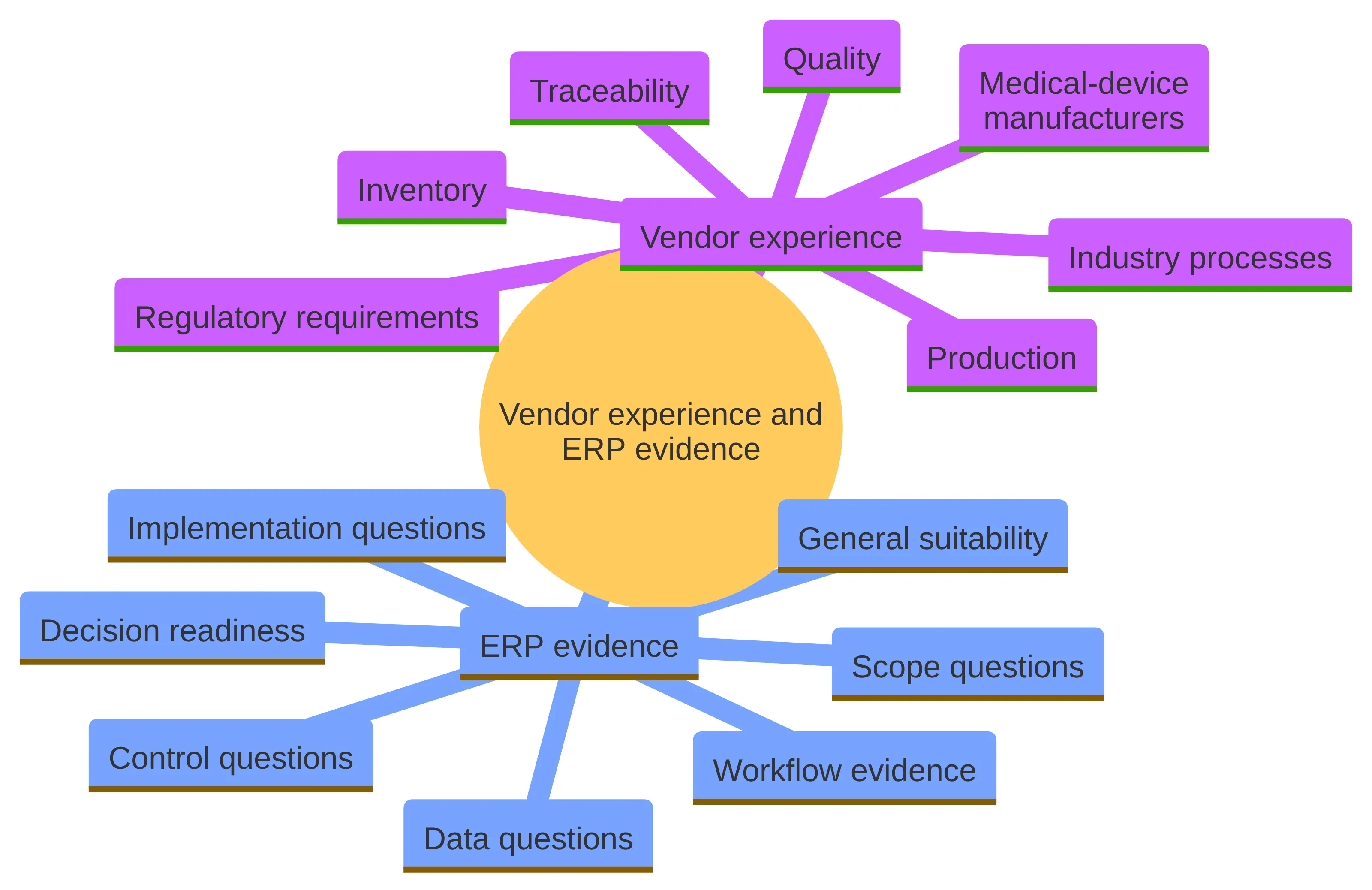
Vendor experience with medical-device manufacturers is a selection question, not a reason to assume fit. Investigate each vendor’s history serving medical-device manufacturers and its experience with relevant regulatory requirements and industry processes. Experience may indicate familiarity with specialized workflows, but it does not replace a demonstration of your required records and decisions.
Ask each vendor to connect its experience to your operating model:
- Which assembled-product workflows has the proposed team supported?
- How does that experience relate to your production, quality, traceability, and inventory requirements?
- Which parts of the proposed solution are standard, configured, or dependent on another application?
- What documentation and testing support are included in the proposed scope?
Keep the answers attached to named requirements rather than recording experience as a standalone score.
ERP evidence has a clear limit: a stated capability does not by itself establish operational fit, validation readiness, or organizational compliance. Product material can identify functions worth testing, while your scenarios determine whether those functions support the way your operation works.
Separate three conclusions in your evaluation record:
- General suitability: the product description appears relevant to a requirement.
- Workflow evidence: the candidate demonstrated the required behavior under your scenario.
- Decision readiness: your organization has resolved the remaining control, data, scope, and implementation questions.
Only the first conclusion follows directly from a broad capability description. The second requires a consistent demonstration. The third requires your internal review of the remaining evidence gaps.
Treat experience as context for the questions you ask. A vendor that has served medical-device manufacturers may understand relevant processes, but that background does not prove that the proposed product, configuration, or team can support your particular workflow. Ask for the connection between the stated experience and the scenario you need to test.
Keep product evidence and vendor evidence in separate parts of the evaluation record. One concerns the behavior of the proposed system; the other concerns the vendor’s experience with relevant operations. Combining them can make a general credibility statement appear to answer a product-fit question.
Convert demonstration results into an initial shortlist
An initial shortlist should be the result of a documented fit test. Use the requirements matrix, the common demonstration records, and the open-question log together. A candidate should progress when it addresses the must-have workflows with evidence that is specific enough for your team to investigate the remaining configuration, integration, data, and control questions.
Use this sequence after the demonstrations:
- Remove duplicate requirements and confirm that each requirement has an owner.
- Separate demonstrated workflows from descriptions, assumptions, and unanswered questions.
- Identify any must-have workflow that remains unresolved.
- Compare the open questions with the boundaries of your current technology ecosystem.
- Keep candidates that merit targeted follow-up and document why each remains under review.
- Record the evidence required before a later procurement or implementation decision.
The sequence creates an initial shortlist without pretending that a demonstration has completed the selection.
A candidate with a strong product description can still leave a material gap in your shortlist record. A candidate with a narrower description can still merit further investigation if it demonstrates the workflows that matter to your operation. Keep the evaluation tied to operational need and the existing technology ecosystem rather than to the breadth of marketing language.
Before you close the shortlist stage, make sure your record identifies:
- The production, inventory, quality, traceability, and cross-functional requirements tested.
- The scenarios each candidate received.
- The evidence each candidate demonstrated.
- The functions requiring configuration, integration, or additional documentation.
- The questions that must be answered before the next decision.
That record gives project leads, operations managers, quality teams, and business owners the same view of why a candidate remains under consideration.
Do not force every candidate into a single overall score if the unresolved questions concern different workflows. Keep the must-have requirements visible and identify which gap controls the next action. One candidate may need a configuration review; another may need an integration answer; a third may need a more complete traceability demonstration.
The shortlist is ready for the next stage when each retained candidate has a documented reason to continue and a defined evidence request. That standard keeps the list useful without presenting it as a final procurement decision or a universal recommendation.
Use the next conversation to close evidence gaps
Your next evaluation conversation should begin with the requirements matrix and the unresolved demonstration records, not with a request for a general product overview. Bring the workflows that matter most, the handoffs that cannot lose their history, and the validation-related controls that need a documented answer. Ask for each gap to be tied to a specific product function, configuration, integration, document, or follow-up owner.
A needs-based shortlist is useful because it makes the next decision narrower and more accountable. It does not replace your organization’s quality, regulatory, legal, or implementation review. Qualified professionals in your organization should determine individual suitability for those decisions after the relevant evidence has been examined.
Take the matrix, common scenarios, candidate notes, and open-question log into the next discussion. The purpose is to identify which requirements are established, which require further testing, and which candidates deserve a more focused review.
Before that discussion, mark the three items that would most change your shortlist if they remain unresolved: a production or scheduling workflow, a quality or traceability record, and a control or integration dependency. Bring the expected result for each item so the conversation produces an answer that can be recorded and compared with the other candidates.
What should you verify before shortlisting a medical-device ERP?
What capabilities should I look for in ERP for medical device manufacturing?
When evaluating ERP for medical device manufacturing, focus on capabilities such as production management, quality control, inventory management, traceability, audit trails, and document management.
How can I create a needs-based shortlist for ERP systems?
To create a needs-based shortlist, start by translating your business objectives into a structured requirements matrix. Then, test each candidate against realistic scenarios that reflect your operational workflows. Candidates should remain on the shortlist if they can demonstrate the necessary capabilities.
What are the key operational requirements for medical device ERP evaluation?
Key operational requirements include managing workflows related to production, quality, inventory, and compliance. It’s important to define which records must be maintained across departments and how they will be integrated into the ERP system.
What validation-related controls should be considered during ERP selection?
During ERP selection, consider validation-related controls such as audit trails, electronic signatures, security measures, testing support, and documentation.
How should I assess vendor experience in the medical device sector?
Assess vendor experience by investigating their history with medical device manufacturers and their understanding of relevant regulatory requirements. This can provide insight into their capability to meet your specific operational needs.
What is the importance of scenario-based demonstrations in ERP evaluation?
Scenario-based demonstrations are important because they allow you to see how each ERP candidate handles real-world situations relevant to your operations. This helps ensure that the system can meet your specific requirements and workflows.
How can I ensure that my ERP evaluation remains focused on my operational needs?
To keep your ERP evaluation focused on operational needs, define clear boundaries for your evaluation that include specific workflows, records, and integration points. Document these requirements and use them as a basis for testing each candidate.
Keep reading
Related articles
Free account
Create A Free Account
Get the clarity you need to make confident ERP decisions — without the sales pressure.
- Read every article (past & future)
- Compare ERP systems side by side
- Access exclusive guides, checklists, and cost breakdowns
- Stay current on industry updates and trends
Get expert guidance at no cost
Rather talk to a specialist?
Book a free call with one of our ERP specialists for a no-obligation needs assessment. We'll help you understand your options, cut through the noise, and figure out what actually makes sense for your business — before you ever talk to a vendor.
Book A Free Call