
What Does ERP Stand for in Manufacturing? A Practical Guide for Discrete Manufacturers
ERP stands for Enterprise Resource Planning
ERP stands for Enterprise Resource Planning. In plain language, ERP is a category of business-management software that brings information and processes from several parts of an organization into a coordinated system. The phrase describes the role of the software, not the name of one particular product.
For discrete manufacturing, the practical meaning starts with the items you make. You may manage individual parts, assemblies, subassemblies, production work, inventory, purchasing, customer orders, and finance. A manufacturing ERP can connect those areas through centralized business data and applications rather than leaving every department to maintain a separate operational view. Manufacturing ERP systems can include production planning, inventory management, quality control, and order tracking.
The definition gives you a useful starting point, but it does not tell you that every ERP system has the same manufacturing scope. Systems differ by type, target organization, features, integration options, automation, scalability, and IT requirements. This guide therefore uses the definition in two ways: first, to explain how the term applies to assembled products; second, to show which operational questions the term leaves open.
Enterprise Resource Planning means coordinating shared business information
Enterprise Resource Planning describes a broad business role. Enterprise points to the organization as a whole rather than one isolated department. Resource points to the materials, inventory, financial information, and other business data that must be managed. Planning points to the work of deciding what needs to happen, when it needs to happen, and which information people need to coordinate that work.
That wording is a useful explanation rather than a promise that software will make decisions for you. ERP provides a centralized platform for managing areas such as supply chain, inventory, and finance. In a manufacturing setting, the value of that scope is the relationship among activities: production depends on materials, purchasing responds to requirements, inventory records what is available, customer orders create commitments, and finance needs information about business activity.
A useful mental model is to treat ERP as a coordination layer for information and processes. It can collect, analyze, and report on businesswide data, while integrated applications provide access to information used by different functions. The coordination does not erase the differences between purchasing, production, inventory, quality, sales orders, and finance. It gives you a way to discuss how those functions relate to the same business activity.
For example, a production discussion may require the product structure, the required components, the planned work, and the material position. A purchasing discussion may require the same product requirements alongside supplier activity. A finance discussion may require the business transactions associated with that work. ERP terminology matters because it places these questions inside one organizational context instead of treating them as unrelated software problems.
A useful way to read the acronym is as three boundaries around the discussion:
- Enterprise describes scope. It points to information and processes considered across the organization, not necessarily to a large organization. ERP systems can be designed for small, midsize, or large businesses. The word therefore signals breadth of business context; it does not establish the size of the manufacturer, the number of users, or the complexity of its operations.
- Resource describes what the organization must coordinate. In manufacturing, that can include materials, inventory, components, assemblies, subassemblies, financial information, and other business data. The word does not reduce ERP to a warehouse record or a list of parts. It points to the information needed to understand how business activity is organized and recorded.
- Planning describes coordination over work and information. It includes questions about what needs to happen, when it needs to happen, and which information people need to coordinate that work. Production planning and scheduling may be part of the manufacturing scope, but the word planning does not mean that the software makes every decision or automatically resolves every constraint.
Reading the words this way also clarifies what the acronym does not imply. “Enterprise” does not mean that every business function has the same process. “Resource” does not mean that all resources are physical materials. “Planning” does not guarantee a particular scheduling method, automation level, or operational result. Those details belong to the system and its configuration, not to the expansion of the acronym.
For a discrete manufacturer, several related terms make the meaning more concrete:
- A finished product is the countable item the business intends to make for sale or distribution.
- A component is a distinct item used in that product, while a subassembly is a recognized assembly within the broader product structure.
- A bill of materials represents the relationship between the finished product and its components or subassemblies. It describes product structure; it does not by itself establish how every planning or inventory process is handled.
- Make-to-stock, make-to-order, and engineer-to-order are possible production workflows. They describe how production may be organized, not the capabilities of a particular ERP system.
- Serial numbers and lot traceability are ways individual components may be tracked. Their presence in a manufacturing discussion does not establish that every system handles tracking in the same way.
This vocabulary helps separate the meaning of ERP from the questions that follow it. “ERP” names the broader business-management software category. “Manufacturing ERP” identifies a context in which production planning, inventory management, quality control, and order tracking may be included. “Discrete manufacturing” identifies the setting of individual products, components, assemblies, and subassemblies. These terms work together, but none of them alone describes the full capability set of a specific system. The practical next question is therefore not whether the acronym sounds relevant, but which of these records and processes your operation needs to relate and how the system represents them.
Overview
You can understand ERP in discrete manufacturing by moving from the general definition to the operational details:
- Meaning: ERP stands for Enterprise Resource Planning and names a category of business-management software.
- Scope: An ERP system can bring together supply chain, inventory, finance, production planning, quality control, and order tracking.
- Manufacturing context: Discrete manufacturing produces individual, countable items such as electronics, machinery, and vehicles. It uses bills of materials for components and subassemblies and may use make-to-stock, make-to-order, or engineer-to-order workflows.
- Information role: Manufacturing ERP systems can collect, analyze, and report on businesswide data so production-related activities can be considered alongside other business functions.
- Boundary: The ERP label does not establish the capabilities, scale, integrations, or configuration of a particular system. ERP systems come in different types, including systems designed for small, midsize, and large organizations.
The term also reflects how business software expanded from manufacturing planning. Manufacturing resource planning concepts integrated purchasing, bills of materials, scheduling, and contract management. Over time, software extended beyond manufacturing into areas such as finance, customer relationship management, and human resources; by 1990, technology analysts used the term Enterprise Resource Planning for this broader category.
That history explains why ERP is broader than a shop-floor application. It does not mean that every system includes every business area or that every capability is equally deep. The system you discuss still needs to be understood through its specific scope.
ERP coordinates the records behind discrete manufacturing
ERP coordinates the records behind discrete manufacturing by giving related functions access to business information within a broader platform. Manufacturing ERP systems collect, analyze, and report on businesswide data to centralize manufacturing operations. ERP software can also provide integrated applications and access to real-time data.
For you as an operations manager, the practical question is not whether every department performs the same work. It is whether the information used by those departments can be understood in relation to the same product, order, material requirement, or production activity. Production needs one view of planned and completed work. Inventory needs a view of distinct parts, assemblies, and subassemblies. Purchasing needs the requirements that drive acquisition. Finance needs business information connected to activity across the organization.
This coordination can support a common operational conversation. If production planning, inventory management, quality control, and order tracking are handled within the manufacturing ERP scope, you can ask how information moves among those activities and how each function uses it. The point is not that one screen or one department replaces every other process. The point is that ERP gives you a framework for examining relationships that otherwise may be discussed separately.
The term records a business need for coordination; it does not guarantee that the underlying information is complete, that every process is covered, or that each user works in the same way. Those are system-specific questions to address separately.
Discrete manufacturing produces countable products and assemblies
Discrete manufacturing produces individual, countable items such as cars, electronics, and machinery. That makes the product itself a practical starting point for understanding manufacturing ERP. Instead of managing production only as an undifferentiated flow of material, you may need to identify the finished item, the components that belong to it, the subassemblies used along the way, and the quantities associated with production.
The distinction matters because discrete manufacturing uses product structures and item-level records. Inventory can include distinct units, assemblies, and subassemblies. Individual components can be tracked through serial numbers or lot traceability. These characteristics give ERP discussions a concrete subject: the item your business is making and the parts, work, and records connected to it.
Discrete production can use different workflows. These workflows are identified as possible discrete-manufacturing patterns, not as features that every ERP system handles in the same way.
A discrete manufacturing ERP can manage production quantities for products intended for sale or distribution. When you explain ERP internally, describe your own product and production model before discussing software categories. That keeps the conversation tied to countable items, assemblies, and the way your operation actually plans work.
Reading the product this way separates three levels of discussion. The item and its structure describe what is being made. The workflow describes how production may be organized: for stock, for an order, or with engineering involvement. The ERP category describes the wider business software context in which those records may be coordinated. None of these levels, by itself, identifies a particular product or establishes that every related function is supported. A discussion can begin with a finished assembly, identify its components and subassemblies, and then state whether work follows a make-to-stock, make-to-order, or engineer-to-order pattern. That description gives production, inventory, and purchasing a shared subject without turning the workflow label into a software specification.
Bills of materials define the product structure
Bills of materials define the product structure used in discrete manufacturing. They identify the relationship between a finished product and the components or subassemblies associated with it. The accepted manufacturing distinction is direct: discrete manufacturing uses bills of materials to manage components and subassemblies.
This gives you a concrete way to translate ERP language into operations language. Instead of asking only whether a system is a manufacturing ERP, ask how your organization represents the products it assembles. Consider the finished item, the component items, and the subassemblies that must be recognized as part of that product structure. The answers describe the information that planning, inventory, purchasing, and production discussions may need to share.
Bills of materials also help explain why ERP developed beyond a simple inventory list. Manufacturing resource planning concepts integrated bills of materials with purchasing and scheduling. The product structure is therefore connected to questions about what must be obtained and when work must be planned, even though the specific treatment of those questions varies by system.
Do not treat a bill of materials as proof that an ERP system provides every related manufacturing function. It establishes a product-structure requirement. The system-specific discussion still needs to cover how that structure is used in the workflows you operate.
Planning connects demand, materials, purchasing, and scheduling
Planning connects several questions that are easy to separate in conversation: what you need to make, which components and subassemblies are involved, what material is available, what must be purchased, and when work should be scheduled. Manufacturing ERP systems can include production planning, while the manufacturing resource planning concepts from which ERP developed integrated purchasing, bills of materials, scheduling, and contract management.
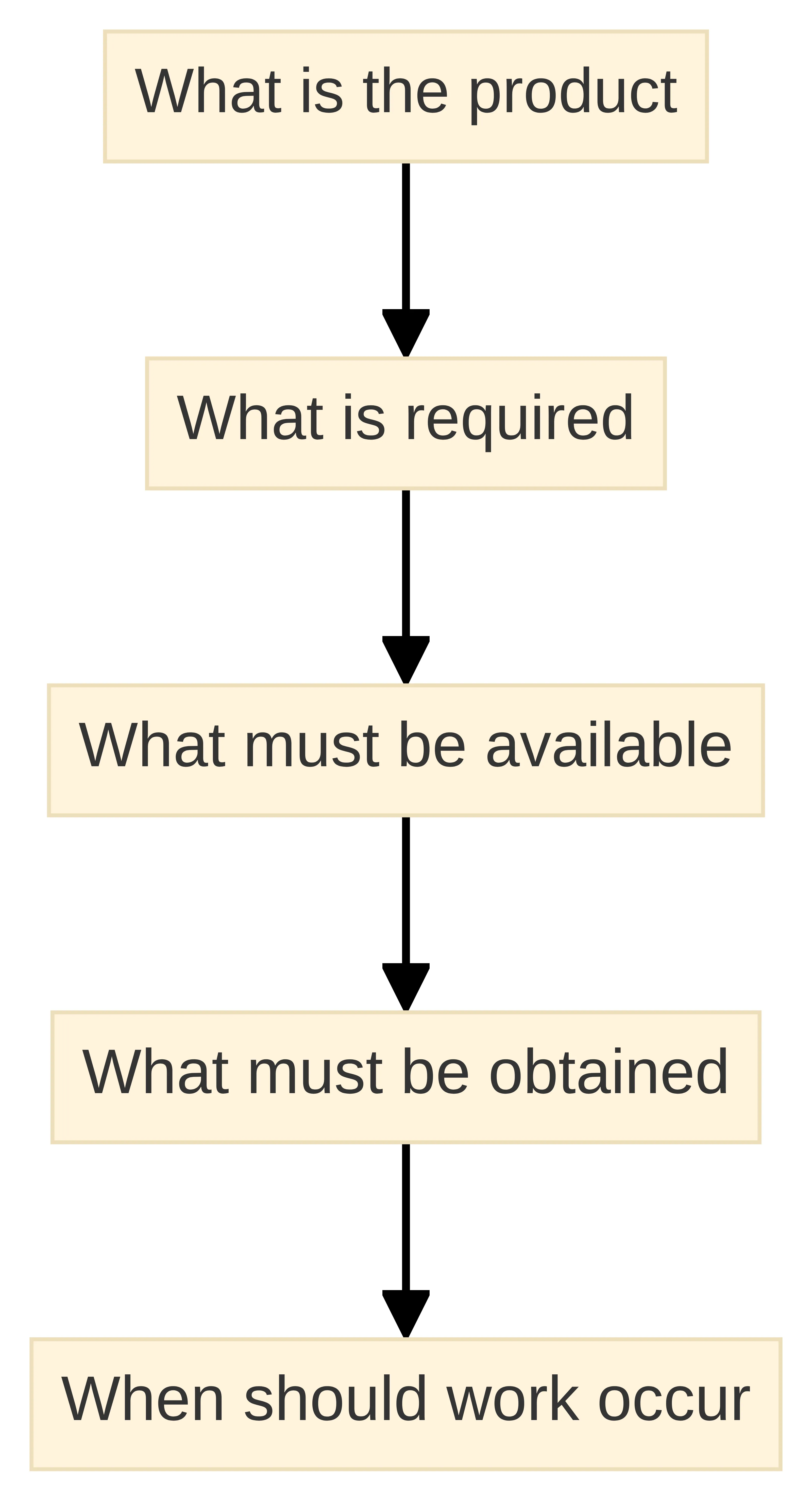
The connection is easier to understand as a sequence of questions:
- What is the product? Identify the finished item and its product structure.
- What is required? Relate the product to its components and subassemblies.
- What must be available? Examine the inventory information associated with the required items.
- What must be obtained? Connect material requirements with purchasing activity.
- When should work occur? Relate the requirement to production planning and scheduling.
This is a way to organize an internal discussion, not a claim that every ERP system performs the sequence automatically.
Your production model affects the questions. Make-to-stock, make-to-order, and engineer-to-order workflows are all identified as possible discrete-manufacturing workflows, so the planning conversation should state which pattern or patterns apply to your operation. ERP can provide a centralized platform for supply chain and inventory management, with access to integrated applications and real-time data.
Use that capability description carefully. It tells you why planning, purchasing, inventory, and scheduling belong in the same ERP conversation. It does not establish the planning method, automation, scheduling depth, or material controls of a particular product.
Production, inventory, quality, and orders share a connected record
Discrete manufacturing adds item-level detail to that discussion. Inventory may involve individual components and assemblies, and components may be tracked through serial numbers or lot traceability.
The phrase connected record should not be read as a promise of one physical database or one universal workflow. It means that you should examine how the system relates operational information across these areas. Ask what product, quantity, order, or production activity each record describes, and then ask which other functions need that information. That is the operational meaning of coordination.
This question-based view separates centralization from sameness. Production, inventory, quality, and order tracking can be discussed in relation to one another because manufacturing ERP can collect, analyze, and report on businesswide data. The relationship concerns the information being considered, not a conclusion that every record has the same purpose or level of detail. A component may be relevant to a product structure and an inventory position; an order may be relevant to production quantities and order tracking; financial information may relate to activity across the organization. These examples clarify the scope of the conversation without asserting a particular workflow. They also explain why capabilities must be checked separately: the ERP category indicates the areas that may be connected, while the specific system determines how those areas are represented and used.
For an operations discussion, this distinction keeps the question concrete. Instead of asking whether ERP connects everything in the same way, ask which product, quantity, order, or production activity is being described and which functions need that information. The answer can then be considered alongside the system’s stated scope, without treating the general meaning of ERP as evidence about a particular implementation.
Finance explains why ERP extends beyond the shop floor
Finance explains why ERP extends beyond the shop floor. ERP provides a centralized platform for managing areas that include financial management, supply chain, and inventory. The broader category emerged as manufacturing resource planning concepts expanded beyond manufacturing into finance, customer relationship management, and human resources.
This does not make finance a production function. It shows why ERP is called enterprise resource planning rather than only production software. Your manufacturing activity exists within a business that purchases materials, manages inventory, accepts or fulfills orders, and records financial information. A broad ERP discussion therefore asks how manufacturing information relates to the rest of the organization.
Finance also gives you a boundary for the term. The presence of financial management in an ERP platform does not establish the depth of manufacturing functionality, and manufacturing functionality does not establish how financial processes are configured. The two areas belong in the same enterprise conversation, but they remain separate subjects for evaluating scope.
When you explain ERP to stakeholders, describe it as a system category that can connect business areas around shared information. Do not reduce it to accounting software, a production scheduler, or an inventory application. Each description captures only part of the enterprise role.
Key Highlights
Keep these points available when you explain ERP to production, purchasing, finance, or executive stakeholders:
- ERP is an acronym: It stands for Enterprise Resource Planning.
- ERP is a software category: It is not the name of one vendor or one product.
- ERP has an enterprise scope: It can provide a centralized platform for areas such as supply chain, inventory, and finance.
- Manufacturing ERP has a specialized context: Production planning, inventory management, quality control, and order tracking can be included in its scope.
- Discrete manufacturing deals in countable products: Bills of materials manage components and subassemblies, while inventory may include distinct units, assemblies, and subassemblies.
- Capabilities vary: ERP systems may be designed for different organization sizes and can differ in features, integration, automation, scalability, and IT requirements.
- Information supports judgment rather than replacing it: ERP data can support operational decision-making, but it does not guarantee better decisions.
ERP is a category, not a vendor name such as SAP
ERP is a category, not a vendor name such as SAP. The phrase identifies a class of business-management software. A named product may belong to that category, but the category label alone does not describe the product’s manufacturing depth, target organization, deployment model, or supported processes.
This distinction prevents a common terminology problem. You can ask whether a named system is an ERP system, but that answer does not tell you whether it represents your product structures, production workflows, inventory requirements, or planning needs. ERP developed as software expanded from manufacturing resource planning into broader business areas, which is why the category covers more than one operational function.
The same distinction applies when you hear phrases such as manufacturing ERP, cloud ERP, or ERP for a particular organization size. Those descriptions narrow the context, but they still do not make every system equivalent. ERP systems can differ in features, integration options, automation, scalability, and IT requirements.
Use ERP as the category name, then add the details that matter to your operation. State that you need to discuss discrete products, bills of materials, production planning, inventory, purchasing, orders, quality, and finance. That vocabulary produces a more useful internal conversation than treating the acronym as a product specification.
Shared information supports visibility without guaranteeing better decisions
Shared information can support operational visibility because manufacturing ERP systems collect, analyze, and report on businesswide data, while ERP software can provide integrated applications and access to real-time data. In practical terms, you may be able to discuss production, inventory, purchasing, orders, and finance with information drawn from a broader business context.
Visibility is not the same as a decision. Information can show what is recorded and make relationships easier to examine, but people still need to interpret the situation, weigh operational constraints, and choose an action. ERP data can support operational decision-making, but it does not guarantee better decisions.
That boundary matters when you explain ERP benefits internally. Avoid saying that the system will automatically improve every decision. Say instead that centralized business data and related applications can give you information to use in operational discussions, including discussions about production and manufacturing activity. Manufacturing ERP systems can apply automation and analytics to centralized business data for manufacturing stakeholders.
The responsible question is therefore specific: which decision are you trying to inform, which business information is relevant to it, and how would the people involved use that information? The ERP definition supports that line of questioning. It does not supply the answer for your operation.
Manufacturing ERP capabilities vary by system and configuration
Manufacturing ERP capabilities vary by system and configuration. ERP systems are available in different types, and systems may be designed for small businesses, midsize businesses, or large enterprises. Those differences can include features, integration, automation, scalability, and IT requirements. The category label describes a general software category, not every feature in every system.
You should separate three statements that are often blended together:
- Category statement: ERP is business-management software for coordinating information and processes.
- Manufacturing statement: Manufacturing ERP systems can include production planning, inventory management, quality control, and order tracking.
- System statement: A particular product has a defined set of capabilities, integrations, and requirements that must be assessed separately.
The first two statements explain the subject. The third sets the boundary around what you can infer from the word ERP.
The same caution applies to discrete manufacturing. A system may be discussed in relation to bills of materials, countable inventory, serial numbers, lot traceability, or make-to-order work, but the general existence of those concepts does not establish how a particular system handles them. Treat each capability as a separate question about your products and workflows.
This distinction separates the category question from the capability question. Start with the processes you need to coordinate, then examine the specific capabilities that those processes require.
Use the definition to frame an internal ERP discussion
Use the definition to frame an internal ERP discussion, not to finish the discussion. A practical starting record can be organized around the information and processes your team needs to coordinate:
- Describe the products. List the individual, countable products, assemblies, and subassemblies that define your discrete operation.
- Describe the product structures. Identify how bills of materials represent the components and subassemblies associated with those products.
- Describe the production patterns. State whether your work includes make-to-stock, make-to-order, engineer-to-order, or more than one of these workflows.
- Describe the connected functions. Record how production planning, inventory, purchasing, quality, order tracking, and finance participate in the same operational activity. Manufacturing ERP systems can include the first five manufacturing areas, while ERP can cover broader business areas such as finance.
- Describe the decisions that need information. For each recurring operational discussion, identify the data your team examines and the people who use it.
This record gives you a precise way to explain why ERP is relevant without promising a particular result. You can say that ERP provides a centralized platform for business areas such as supply chain, inventory, and finance, and that manufacturing ERP can centralize manufacturing data across production-related functions. You can then ask how the information would support the decisions your team makes. ERP data can support those decisions, but it does not guarantee better decisions.
Keep the discussion at the right level. First establish the products, workflows, information, and decisions. Then separate the general ERP category from the capabilities of any particular system.
What the ERP definition does not establish
The definition also does not establish:
- that a particular system represents your bills of materials or discrete production workflows in the way you require;
- that real-time data is available for every process or user;
- that centralized information will automatically produce a better operational decision; or
- that the ERP label alone identifies a suitable product for your organization.
These are boundaries, not objections to ERP. They tell you which questions remain after you understand the acronym and its general role.
Manufacturing ERP systems can include production planning, inventory management, quality control, and order tracking, and they can collect, analyze, and report on businesswide data. Those supported capabilities still need to be related to your own products, workflows, and operational decisions. Data can support decision-making without guaranteeing better decisions.
The definition also does not answer a vendor-selection question, provide pricing, or determine individual suitability. It gives you the language for beginning a structured conversation. Your next questions must be based on the discrete manufacturing work you need to coordinate.
Carry a precise ERP definition into the next conversation
ERP stands for Enterprise Resource Planning. In this context, “enterprise” points to businesswide scope; “resource” connects with the products, components, subassemblies, and inventory a manufacturer tracks; and “planning” includes production planning and scheduling. The expansion describes a category of business-management software, not a specific vendor or product.
For discrete manufacturing, individual countable products may be defined through bills of materials and produced through make-to-stock, make-to-order, or engineer-to-order workflows. An ERP system can include production planning, inventory management, purchasing, quality control, order tracking, and finance-related information, but capabilities vary by system and configuration. Centralized data can support operational decision-making without guaranteeing better decisions.
What should an operations manager clarify before discussing ERP?
What does ERP stand for in manufacturing?
ERP stands for Enterprise Resource Planning, which is a category of business-management software designed to coordinate shared information and processes across various functions within an organization.
How does ERP support manufacturing operations?
ERP systems help manage daily operations in manufacturing by integrating areas such as production planning, inventory management, quality control, and order tracking, allowing for centralized data access and improved operational visibility.
What types of businesses can benefit from ERP systems?
ERP systems are designed for various business sizes, including small, midsize, and large enterprises, with capabilities that can differ based on the specific needs and complexity of the organization.
How does ERP facilitate decision-making in manufacturing?
ERP systems provide centralized access to real-time data and integrated applications, which can support operational decision-making by allowing stakeholders to analyze relevant information across different business functions.
What are the key features of manufacturing ERP systems?
Manufacturing ERP systems typically include features for production planning, inventory management, quality control, and order tracking, all aimed at centralizing and streamlining manufacturing operations.
What should organizations consider when evaluating ERP systems?
Organizations should assess the specific capabilities, integration options, automation, scalability, and IT requirements of ERP systems to ensure they align with their operational needs and business goals.
Keep reading
Related articles
Free account
Create A Free Account
Get the clarity you need to make confident ERP decisions — without the sales pressure.
- Read every article (past & future)
- Compare ERP systems side by side
- Access exclusive guides, checklists, and cost breakdowns
- Stay current on industry updates and trends
Get expert guidance at no cost
Rather talk to a specialist?
Book a free call with one of our ERP specialists for a no-obligation needs assessment. We'll help you understand your options, cut through the noise, and figure out what actually makes sense for your business — before you ever talk to a vendor.
Book A Free Call